How I prepare a presales demo in 30 minutes: new instance, seeded data, and a deck
Each prospect gets their own instance, filled with machines from their kind of plant, plus a deck that matches what they'll see. One research prompt, three scripts and one CLI make that a half-hour job.
When a maintenance manager agrees to a demo, the worst thing I can show them is somebody else’s factory. A shared demo account with a generic “Pump 01” and last year’s tickets makes them do the translation work in their head, and most people stop paying attention right about there.
So every prospect gets their own OpexMX instance, at its own URL, with assets, technicians, failure history and spare parts that look like their plant. It sounds like a lot of work for one meeting. It used to be. Now it takes me about 30 minutes, most of it spent on the part that needs a human: deciding what their plant looks like.
This post walks through how that works, using OpexMX, the maintenance execution system I build at Opex Consulting Group. The specifics are ours, but the pattern works for any multi-tenant SaaS that has to be demoed a lot.
The 30 minutes at a glance
| Time | Step | What runs |
|---|---|---|
| 0–10 | Research the client, write the seed profile | One prompt, one data file, no code |
| 10–15 | Provision the instance | provision-tenant.ts, 9 steps |
| 15–25 | Seed it | The seed engine, about 50 steps |
| 25–30 | Review in the UI, build the deck | Clicking through the app, kantor slides build |
Steps 2 and 3 mostly run on their own, so while the seed is going I’m already writing the deck. The 30 minutes assumes the first look in the UI only needs small fixes. A round that needs a reset and a fresh seed adds about ten minutes, most of it waiting.
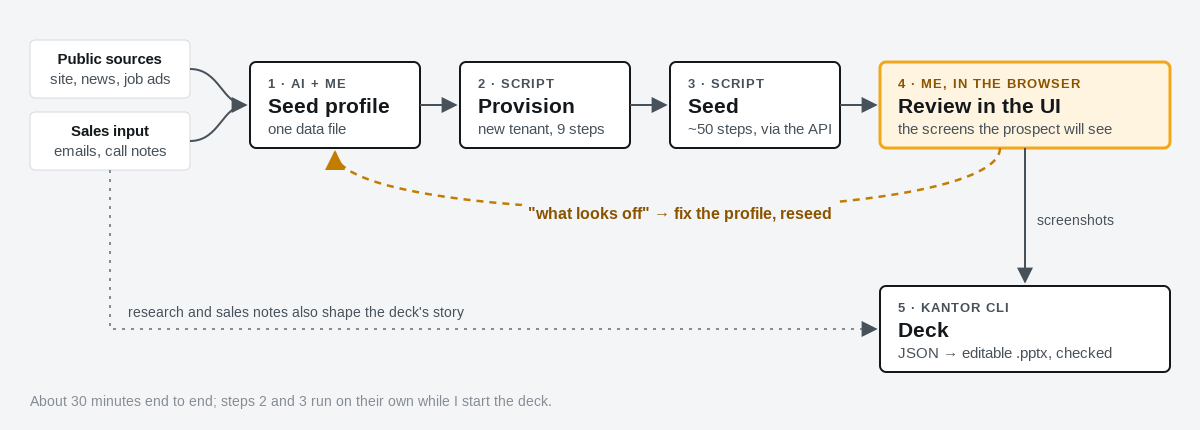
1. A seed profile is data, not code
The seed engine is one program that knows how to fill every table in OpexMX: users and roles, sites and areas, assets, spare parts, tickets, PM schedules, checklists, training, tools, compliance records, sensor readings and more. What it doesn’t know is which plant to fill them with. That comes from a profile: a single TypeScript file that only holds data.
scripts/seed/
  lib/orchestrator.ts  runSeed(): the pipeline
  lib/generators.ts    derives the history
  lib/defaults.ts      shared statuses, units
  profiles/demo.ts     one file per industry
scripts/seed-<industry>.ts  4-line shim
A profile lists the things only a person can decide: the sites and areas, the machines and their criticality, the people and their roles, the parts that wear out, the problems and symptoms a technician would recognise. A tank farm and a bottling line need different things here, which is the whole point.
const assets = [
  { name: 'Main Plant', code: 'SITE-MAIN',
    assetType: 'SITE', criticality: 'critical' },
  { name: 'Utility Plant Room',
    code: 'AREA-UTIL', assetType: 'AREA',
    parentCode: 'SITE-MAIN' },
  // ...machines under each area
];
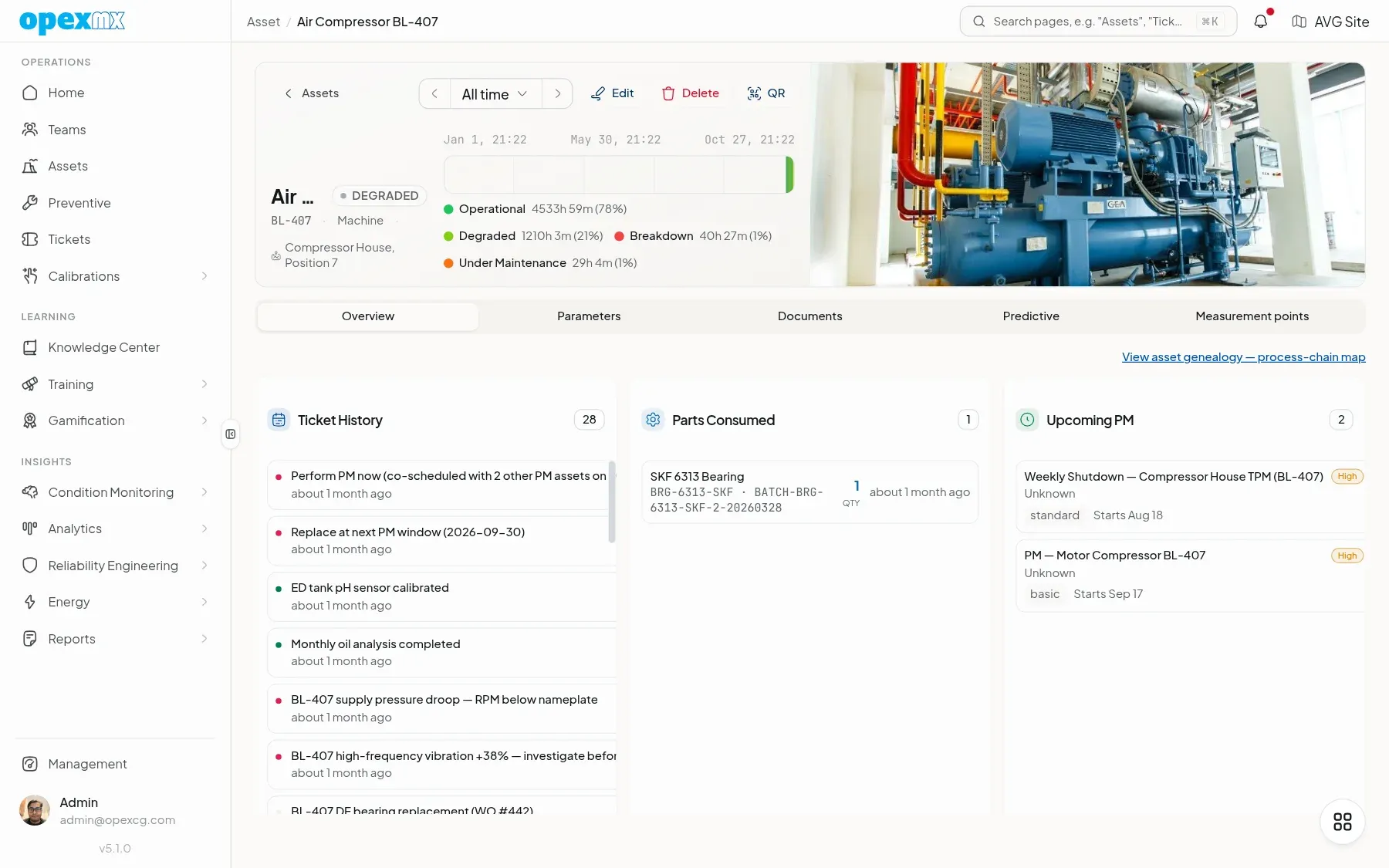
Everything else comes from generators that read the profile’s assets and users and derive the rest: asset status events for MTBF and MTTR, sensor readings, rosters, leaderboard points, condition triggers, workflow runs. I don’t write a downtime history by hand. I give the engine a compressor and three technicians, and it produces a believable history of that compressor breaking and those technicians fixing it.
Research first, in the same prompt
The profile is only as good as what I know about the prospect, so the profile and the research happen in one go. I give an AI coding agent a single prompt that asks it to:
- Research the client from public sources: their website, products and plants, news, annual or sustainability reports, and job postings. Job ads are surprisingly useful. A plant hiring three maintenance planners and a reliability engineer is telling you where it hurts.
- Read what sales already knows. If there’s an email thread with the prospect, notes from the discovery call or a short brief from the sales team, it goes into the same prompt. That’s usually where the real pain is: “our PM is still on Excel”, “audits keep finding expired certificates”, “we can’t see spare part stock before a job”.
- Draft the profile from the closest existing one: their kind of machines in their kind of layout, the failure modes that industry actually has, the spare parts that wear out, and the problems their technicians would recognise.
- List what it found and where, keeping facts from sources apart from guesses, so I can check them.
I skim the draft for anything plainly wrong, but I don’t review it line by line. A profile is hundreds of lines of arrays, and checking it as code or as a spreadsheet tells me very little about what the prospect will see. The real review happens later, in the app (step 4). The research shapes the plant; the people in it are made up, and anything confidential from the sales notes stays out of the data.
The same research feeds the deck later, so the slides talk about the prospect’s problems rather than ours.
Adding a new industry means copying a profile, changing the data and adding the shim. No seeder code gets written.
2. Provision the instance: one command, nine steps
Each OpexMX customer gets an isolated instance with its own app deployment, database and file storage, so a demo instance is a real tenant, not a flag on a shared one. provision-tenant.ts builds it:
- Create the tenant’s database
- Create its file storage
- Make sure the shared search index exists (the AI search needs it before deploy)
- Generate the instance config, keys and secrets
- Deploy the app
- Set the instance secrets
- Run the database migrations
- Create the admin user and permissions through the API
- Record the deployed version
A demo wrapper around it is about 35 lines. It picks the tenant id and admin email and calls provisionTenant():
const { password } =
  resolveDemoPassword('ACME_DEMO_PASSWORD');

provisionTenant({
  tenantId: 'demo-acme',
  adminEmail: '[email protected]',
  tempPassword: password,
});
The instance then lives at demo-acme.mx.opexcg.com. Two details make this safe to run in a hurry:
- It can be re-run. If step 5 fails because my deploy credentials expired, I fix them and run it again. Existing databases and storage are reused, not duplicated.
- No password is ever committed. The admin password comes from an environment variable, or is generated and printed once. The seed reads the same variable later.
3. Seed it
A fresh tenant refuses sign-ups and rate-limits by IP, which is right for production and wrong for a script that creates hundreds of records in a few minutes. So before seeding I set a bypass token as a secret on that one instance, then run the seed with Bun:
# after setting SEED_BYPASS_TOKEN on demo-acme
ACME_DEMO_PASSWORD=<password> \
SEED_BYPASS_TOKEN=<token> \
  bun run scripts/seed-acme.ts \
  https://demo-acme.mx.opexcg.com
The seed signs in as the admin and works through the pipeline in order, because most steps need the ids of the ones before: users, then roles, then assets, then parts, then tickets that point at those assets and parts, then everything that hangs off tickets. It talks to the public API the same way the web app does, so a seed run also doubles as a rough end-to-end test of the release I’m about to demo.
One rule I learned the hard way: seed once. The engine detects rows that already exist, but after a partial failure some generators can still write a second copy of their history, and a dashboard with every breakdown counted twice is worse than an empty one. If a seed run breaks halfway, I reset the tenant and start clean rather than patching it.
4. Review it in the UI, and iterate on what you see
This is the step I care about most. As the human in the loop, I review the demo in the running app, not in the profile file, an Excel sheet of assets, or anything else that doesn’t look like what the prospect will see.
Data that reads fine in a file often looks wrong on screen:
- An asset tree that made sense as a list is three levels too deep to show quickly.
- A dashboard is technically full but has one tall bar and nothing else, because all the breakdowns landed on one machine.
- A machine name is right for the industry but too long, and gets cut off on the ticket card.
- The open-ticket list has forty items, so the one I want to open in the meeting is on page three.
None of these show up when you read the data. All of them are obvious the moment you open the page. So I click through the route I’ll take in the meeting, write down what looks off, and hand that back to the agent in plain words: “spread the breakdowns across the filler line, not just one machine”, “shorten the conveyor names”, “close most of the old tickets”. It fixes the profile, and I look again.
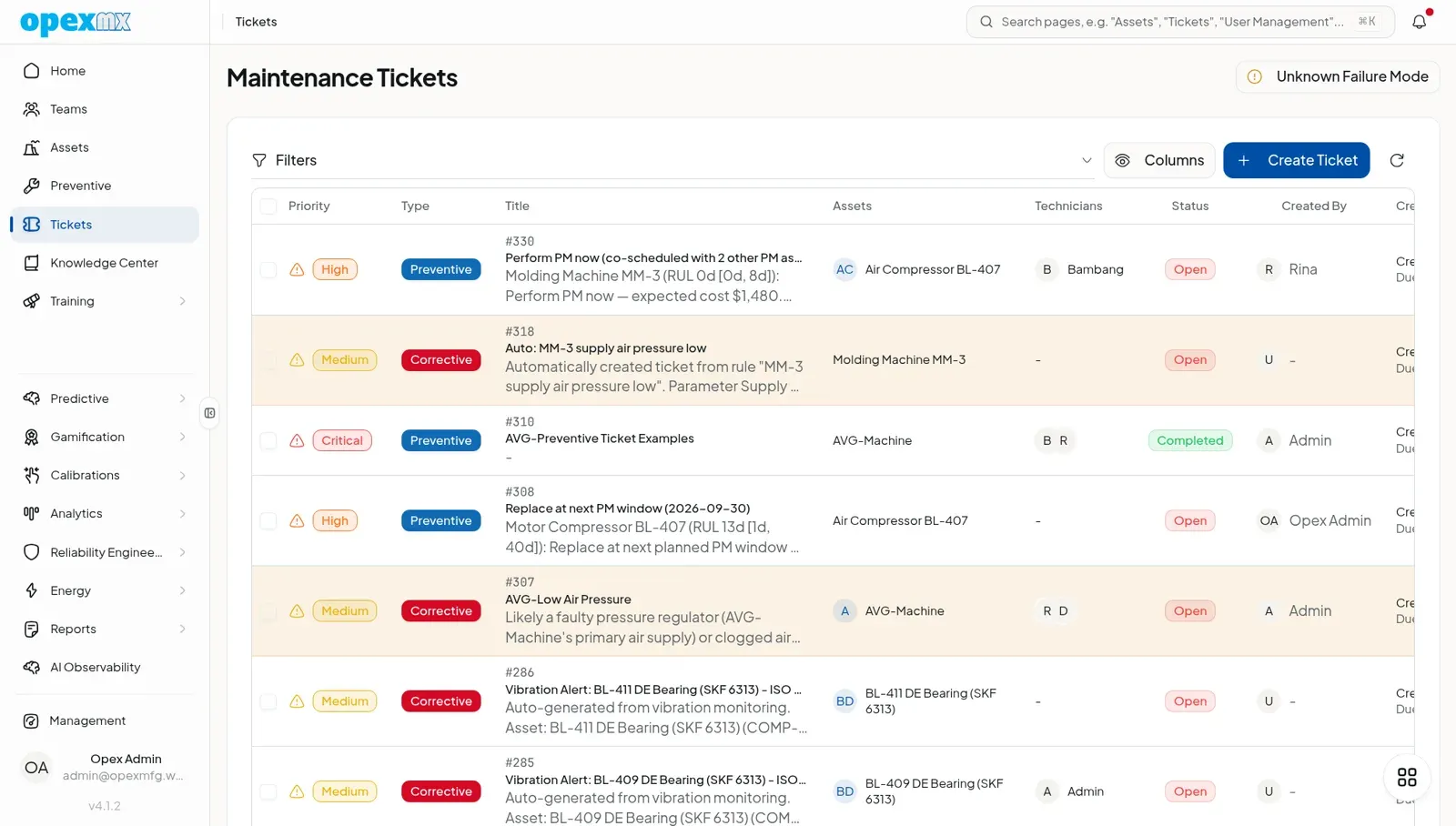
Because of the seed-once rule, a bigger change means resetting the tenant and seeding again, which takes minutes and runs on its own. Small fixes, like renaming one asset or closing a few tickets, I just make in the UI directly, the same way the customer will. Either way, the next check happens on screen again, never in the file. Usually one or two rounds are enough.
Alongside my own clicking, a small script walks the same pages headlessly and records, per page, the final URL, any console errors and any failed requests. If a page in my demo path throws an error, I find out now, not with the plant manager watching. Its screenshots are also the raw material for the deck.
5. Build the deck from JSON with Kantor
The deck is written as JSON and built into a native, editable .pptx with the kantor slides CLI from Kantor, a free, open-source office suite for Word, Excel and PowerPoint files that runs on Linux, macOS and Windows. Here is a minimal deck:
{
  "preset": "swiss",
  "slides": [
    { "title": "Maintenance on one screen",
      "subtitle": "OpexMX for a beverage plant" },
    { "title": "What you will see today",
      "bullets": [
        "A breakdown ticket from QR scan to close",
        "PM schedules built from your asset list",
        "MTBF and MTTR for the filler line"
      ],
      "notes": "Keep this to one minute." }
  ]
}
kantor slides build deck.json -o demo.pptx --check
kantor convert demo.pptx -o preview \
--to png --contact-sheetI review the deck the same way I review the demo: by looking at the slides, not by reading the JSON. --check lays the slides out the way they will render and reports what’s wrong: text overflowing its box, shapes off the slide, low contrast, fonts that aren’t installed, slides without speaker notes.
Here is what that looks like. My first draft of the example deck below put three stat cards in a column too narrow for them:
$ kantor slides check demo.pptx --slide 4
demo.pptx: 1 slide checked: 5 errors, 5 warnings, 0 info
slide 4
  error   text_overflow       "Stat card 1 value" (id 7): a line is 1.37 in wide but the box holds 0.67 in (a word longer than the box); it sticks out at the side
  error   text_overflow       "Stat card 1 label" (id 8): a line is 1.11 in wide but the box holds 0.67 in (a word longer than the box); it sticks out at the side
I swapped them for a numbered list, rebuilt, and the check came back clean.
The contact sheet puts every slide in one image so I can look at the whole deck in a few seconds.
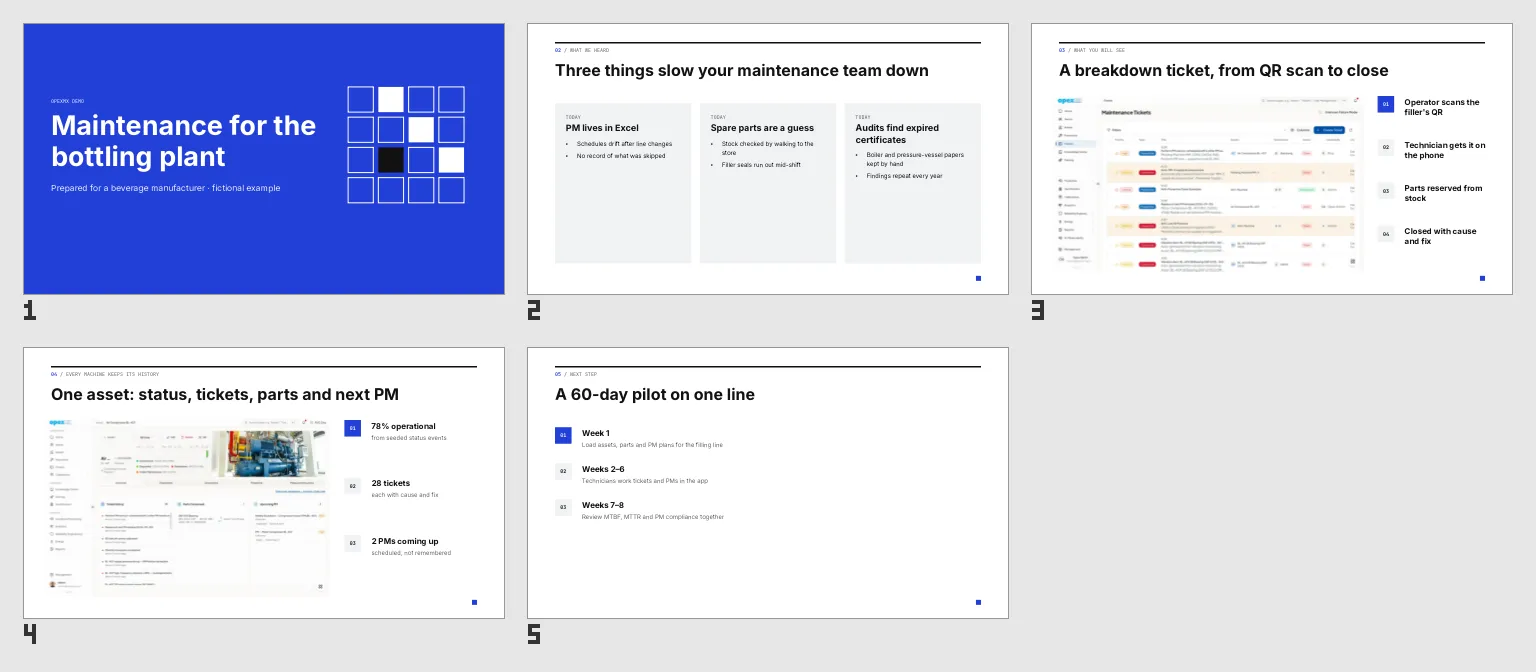
Writing the deck as JSON is quick for the same reason the seed is quick: the story stays the same between prospects and only the details change. The industry, the pain points from the research and the sales notes, the machines named on the slides and the screenshots are different each time. The order (their problem, what they’ll see, how a pilot works, what it costs) barely moves. And because the output is a real .pptx, anyone in sales can open it in PowerPoint and change a line without asking me.
What makes this fast
None of this is clever. The speed comes from a few boring decisions:
- Research and sales input go in once. One prompt feeds the profile, and the profile and notes feed the deck.
- Data is separate from code. A new industry is a new data file. The engine doesn’t change per prospect, so it gets better every time anyone uses it.
- Every step can be re-run, except the one that can’t, and that one is written down at the top of the script.
- Secrets stay out of the repo. Passwords come from the environment or are printed once. Demo instances are real tenants and are treated like them.
- Review what the prospect will see. The human check happens in the running app and on the rendered slides, never in a data file. Feedback goes back to the agent in plain words, and the next look is on screen again.
- Let machines catch the boring errors. The seed exercises the API, the page walk catches console errors, and
--checkcatches slide problems, so my own review can be about whether the demo tells the right story.
The 30 minutes holds only because the engine, the generators and the deck layout already exist. The first industry profile took far longer than half an hour. That cost is paid once, so each new demo only costs the thinking about the prospect’s plant.
Try the tools
- OpexMX is the maintenance execution system in this post: work orders, preventive maintenance, spare parts, reliability and predictive maintenance, on web and mobile. The product tours show each module in a couple of minutes. To see a demo set up for your own kind of plant, the way this post describes, get in touch.
- Kantor is the office suite behind the deck: Sheets, Docs and Slides in one small app, plus the
kantor slides,kantor docsandkantor sheetscommand-line tools used here. It’s free, open source and works offline.